![image01.jpg]](https://vault.revgravy.com/hs-fs/hubfs/image01.jpg?height=47&name=image01.jpg)
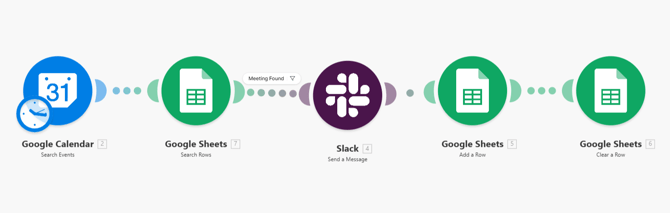
What this automation does and when it triggers:
2 or 3 hours before any client meeting (Weekly or Bi-Weekly), this automation creates a draft agenda and posts it to the architect in Slack. The architect reviews, edits if needed, and sends to the client.
Step-by-step flow
|
Step |
Tool |
What happens |
|
1. Scheduled trigger |
Make.com |
Runs every 2 hours — checks for upcoming meetings in each Architect's Calendar |
|
2. Search for a existing meeting on Google Sheets |
Google Sheet |
Search for existing meeting on Google Sheets. If found, it gets Slack message. |
|
3. Post to Slack |
Slack |
Posts the draft to the architect with a note to review and send |
|
6. Add info to another sheet |
Google Sheet |
Adds send agenda data to another sheet to keep a log. |
|
5. Remove Agenda data |
Google Sheet |
Deletes Agenda Data so only the last meeting is the one for the agenda. |
Fellow.ai coverage gaps
|
Client |
Reason — manual workaround |
|
Vannoppen |
White-label engagement — client does not know RevGravy exists. Fellow bot cannot join. Architect preps agenda manually. |
|
Nuance Medical |
No-recording policy due to medical privacy requirements. Architect preps agenda manually. |
Architect's Make.com Automations:
| Architect | Make.com Automation Link |
| Juan | https://us1.make.com/602982/scenarios/4649178/edit |
| Sparsh | https://us1.make.com/602982/scenarios/4653993/edit |
| Alex | https://us1.make.com/602982/scenarios/4653998/edit |
Troubleshooting
|
Symptom |
Likely cause |
Fix |
|
No agenda posted |
Google Sheet missing meeting data |
Check Make.com execution log → re-run manually if needed |
|
Agenda content is wrong |
Wrong Fellow notes fetched or AI returned unexpected output |
Check which Fellow note was used — confirm it matches the right client |
|
Wrong Slack channel |
Channel mapping error in Make.com |
Check the Slack module — confirm channel ID matches the client's dedicated channel |